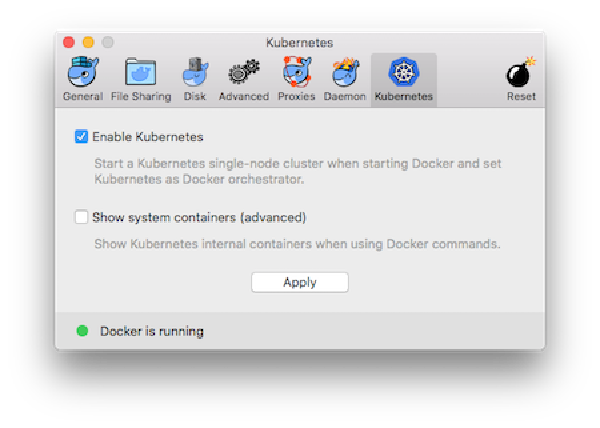
My focus for the last 18 months having been on deployment to Kubernetes, I was excited to hear the news back at DockerCon that Docker Inc were recognising the dominance of Kubernetes. This included adding support to Docker Enterprise Edition (alongside Swarm) and to Docker for Mac/Windows. The latter has now hit beta in the edge channel of Docker for Mac and the following are my first impressions.
Things have been a little hectic recently and a whole month has slipped past without a blog post. The following is old news now but it’s still something that I wanted to call out. As of mid-September, all the official images on Docker Hub have been multi-arch enabled and many of them, including the websphere-liberty image, are now available for multiple platforms.
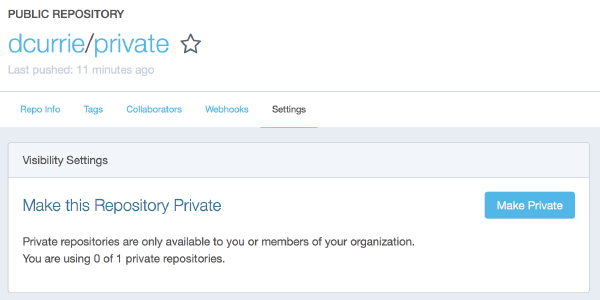
Sometimes Docker Hub really is just the quickest and easiest way to share an image from one place to another, particularly when the place I’m trying to share to is expecting to just do a docker pull. It’s not always the case that I want to share those images with the rest of the world though. Docker Hub’s answer to this is the private repository but, on a free plan, you only get one private repository. What you have to remember though is that a repository can contain multiple images: they all share the same name but each has a different tag.
As I posted here on the Microservice Builder beta, I thought it only fair that I should offer an update now that it is Generally Available. There is already the official announcement, various coverage in the press including ZDNet and ADT, a post from my new General Manager Denis Kennelly, and, indeed, my own post on the official blog, so I thought I’d focus on what has changed from a technical standpoint since the beta.
Docker 17.05 enabled the ability to perform multiple build stages in a single Dockerfile, copying files between them. This brings to regular Docker build a capability that I’ve previously talked about in the context of Rocker, and something that’s of particular use in a compiled language like Java. Let’s see what it would look like in the context of the WebSphere Liberty ferret sample.
When the frequency of blog posts drops on this site it generally has two causes: I’m busy and/or I’m working on something that’s IBM Confidential. Both of these have been true over the past six months or so whilst I’ve been working on something we’re calling Microservice Builder. A public beta was announced in the run up to InterConnect which went live on the 24th which means that I can now come up for air and say a little about the work we’ve done so far.
I’m finally back home after what feels like a very long week in Las Vegas at IBM’s InterConnect conference. I promised that I’d post my presentations on SlideShare and I’ll add a few comments here on how each session went.
I’m going to be at IBM’s InterConnect conference this coming week. If you’re going to be there too, there’s a quick run-down of the sessions I’ll be presenting below. The astute will notice that, due to a scheduling snafu, I’m supposed to be presenting two sessions at the same time on Tuesday. If you go to the Liberty/ IBM Containers session then I’m afraid you’ll have to make do with Tom - be kind to him!
Reading Daniel Bryant’s O’Reilly publication Containerizing Continuous Delivery in Java reminded me of the challenge of determining how processors are available to you when running in a container. In the case of Java, a call to Runtime.getRuntime().availableProcessors() should show this all important information. A quick check reveals that, when called in an unconstrained container, this correctly returns the number of cores on my physical hardware (Docker on Linux) or assigned to the VM containing the Docker Engine (Docker Toolbox or Docker for Windows/Mac). If I used the --cpuset-cpus option on docker run to constrain the cores available to the container then this is also correctly reflected in the value returned. The difficulty arises when access to those CPUs is constrained in other ways.
Docker 1.13 finally made it out the door earlier this week and I found some time to play around with it this weekend. I shan’t enumerate all of the new features here as the introductory post from Docker does a good job of that (or you can see the release notes for the gory details). Instead I’ll talk a little bit about some of the features that are of particular interest to me.
For reasons that I won’t go in to here, I’ve been interested in the CPU accounting aspect of cgroups for a while and I recently found some time to have a poke at what information is available in the Docker remote API. I was interested in getting hold of the actual CPU time used by a container versus the elapsed time that the container has been running for (where the former would be smaller if the container is not CPU intensive and would potentially be much larger if it’s chewing through multiple cores).
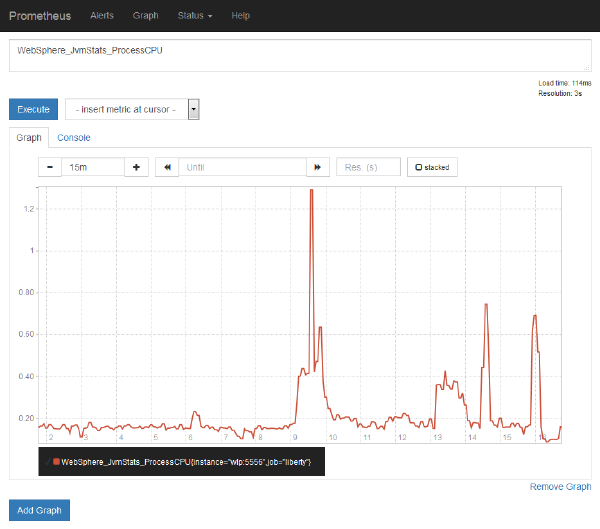
It’s been on my to-do list for some time to try setting up Prometheus to monitor WebSphere Liberty. There is a JMX Exporter which makes the job pretty simple even if there ended up being more steps than I had originally hoped.
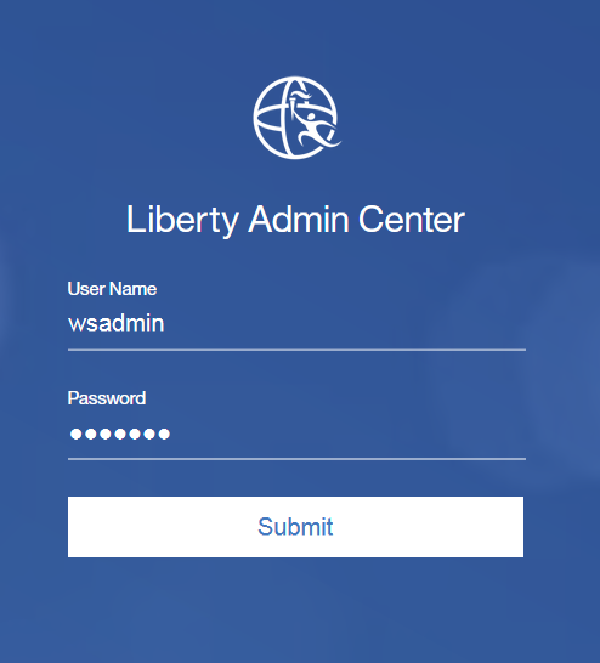
The content of the WebSphere Liberty Docker images currently match the runtime install zips that we make available for download from WASdev.net. One consequence of this is that none of them contain the admin center. Adding it is very simple though as the following Dockerfile shows:
Having written a few posts on using the IBM Containers service in Bluemix I thought I’d cover another option for running Docker on IBM Cloud: using Docker on VMs provisioned from IBM’s SoftLayer IaaS. This is particularly easy with Docker Machine as there is a SoftLayer driver. As the docs state, there are three required values which I prefer to set as the environment variables SOFTLAYER_USER, SOFTLAYER_API_KEY and SOFTLAYER_DOMAIN. The instructions to retrieve/generate an API key for your SoftLayer account are here. Don’t worry if you don’t have a domain name free - it is only used as a suffix on the machine names when they appear in the SoftLayer portal so any valid value will do. With those variables exported, spinning up three VMs with Docker is as simple as:
For a while now I’ve had a bullet point on a chart that blithely stated that you could add an application on top of our WebSphere Application Server traditional Docker image using wsadmin and, in particular, with the connection type set to NONE i.e. without the server running. Needless to say, when I actually tried to do this shortly before a customer demo it didn’t work! Thankfully, with moral support from a colleague and the excellent command assistance in the admin console, it turns out that my initial assertion was correct and the failure was just down to my rusty scripting skills. Here’s how…
Looking for solutions to my archive extraction problem brought me to look at the Rocker project from Grammarly. I’d looked at it before but not in any great detail. In a nutshell, it aims to extend the Dockerfile syntax to overcome some of its current limitations. Although not an option for me (because I can’t depend anything beyond the standard Docker toolset) the Rocker solution to my earlier problem would be as simple as follows:
The way we build our WebSphere traditional Docker images is as a two-step process. First we install the products using Installation Manager and generate a tar file containing the installed product. Then we suck that tar file in to a clean image so that the resulting image does not contain all the cruft left lying around from the install process. (Not including Installation Manager in the final image also helps to reinforce that these images are intended to be immutable.)
The lifetime of a Docker container is tied to the lifetime of the PID 1 process executed when the container was started. WebSphere Liberty has a convenient server run command to run the application server in the foreground. Sadly, that’s not the case with the traditional WebSphere’s startServer.sh script which simply starts the server process in the background and then exits. To ensure that the container didn’t exit as well, we started out with a script something along the following lines:
On Friday I attended my third Container Camp UK. The venue had changed once more, this time taking up residence in the Picturehouse Central cinema by Piccadilly Circus. As with last year, this meant comfy seats which, contrary to what you might think, actually makes it easier to stay awake! In another repeat from 2015, we started late and connecting to the projector proved problematic throughout the day. This time we had a selection of shiny MacBooks with their new-fangled USB-C connectors to thank!
The films on my flight to the US this week weren’t much to write home about so I ploughed through some of my Safari Queue backlog. Two of the Docker related books on my queue were from Packt Publishing.